Mods · Modrinth & CurseForge
Thousands of mods. One click.
The built-in browser brings mods, resource packs and shaders from Modrinth and CurseForge straight into your profile – with dependencies, updates and rollback.
Performance pack
0/6 installed · dependencies are resolved automatically
- S
Sodium
Rendering optimisation · Modrinth
- L
Lithium
Game logic & server tick · Modrinth
- F
FerriteCore
Lower memory use · Modrinth
- M
ModernFix
Faster startup, smaller heap · Modrinth
- I
ImmediatelyFast
Faster immediate-mode rendering · Modrinth
- E
EntityCulling
Skips hidden entities · Modrinth
Simplified recreation. In the launcher: screenshots, descriptions, dependency preview, conflicts, updates, rollback and removal – for mods, resource packs and shaders.
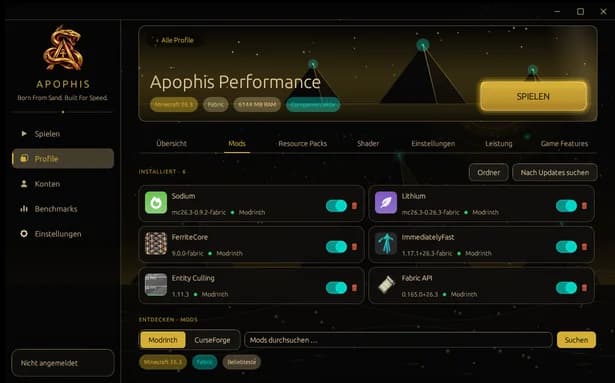
In the launcher
Launcher: Mods
Installed mods with switches, discovery via Modrinth and CurseForge.
Workflow
From search to rollback.
- 1
Find
Search Modrinth and CurseForge, with screenshots, descriptions and filters by version and loader.
- 2
Check
Dependency preview and conflict detection before anything is installed.
- 3
Install
One click. Downloaded in parallel, SHA-verified, straight into the right profile.
- 4
Maintain
Updates, rollback, removal – and an on/off switch for every card.
Modpacks
Import packs – tested with real packs.
.mrpack
Modrinth
.zip
CurseForge
.noriskpack
NoRisk Client
.apophis
Apophis profile
Profiles can also be shared as a share code.
Moving in
Your instances come along.
Version and loader come from metadata or the game log; mods, configs, packs, worlds and options are carried over. The source stays untouched – verified with 50 real instances.
- CurseForge app
- Modrinth App
- Prism
- MultiMC
- Minecraft Launcher
Existing game files from these launchers are reused after SHA-1 verification: a fresh install of 26.3 in 4.9 s instead of 27.6 s.
Profiles
Every profile its own client.
Its own folder, its own mods, its own look. Create, duplicate, export – and decide per profile which companion features are active.
The tabs of the profile workspace in the launcher. Forge and NeoForge are in the data model but don’t launch yet.